Senior User Experience Designer and Accessibility Expert
I'm a UX specialist, and I love improving systems and simplifying the complex.
Find and Redact: UX design for a data loss prevention feature in Glasswall Meteor
Designing an accessible, scalable DLP tool for a wide range of users, from the
non-technical to security professionals
Problem statement:
Organizations handling sensitive documents face real risk when that information spreads unchecked, internally or externally. Social security numbers, credit card data, passport numbers, health records — the stakes are high, and the compliance requirements (PCI, HIPAA, GDPR, CCPA) are significant.
Existing options were inadequate. Microsoft Office's find-and-replace requires opening files one at a time. Dedicated DLP tools search only the visual layer. Glasswall's Find and Redact addressed both gaps: built on top of CDR, it uncovers all strings in the visual layer, including hidden metadata, and processes single files or large batches in one workflow.
My role:
Sole UX designer, end-to-end, from the beginning of the project. Responsibilities included defining the feature's structure and interaction model, deciding where and how it surfaced across the Meteor UI, conducting user testing to validate the workflow as it was being defined, and ensuring designs met WCAG 2.2 AA requirements while working within Meteor's established design patterns.
Users and goals:
Find and Redact serves a broad audience across sectors, including legal, healthcare, finance, government, and insurance.
-
Security professionals and IT admins: set and manage rules to prevent sensitive data from moving through or out of their organization
-
Non-technical end users: complete redaction tasks without needing to understand regular expressions or underlying technical logic
-
CISOs and buyers: demonstrate compliance with regulatory requirements at scale, across large numbers of files
Design strategy:
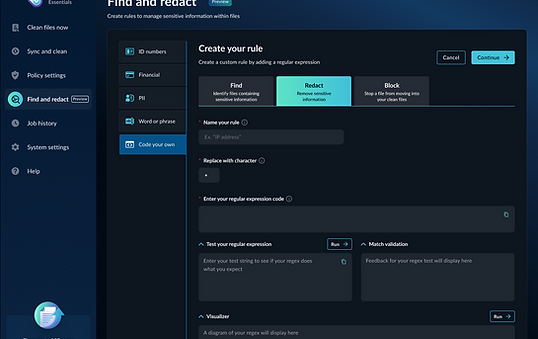
Three actions, clearly defined - The core structure — Find, Redact, and Block — was my decision. Each action needed to be immediately understandable to users with very different levels of technical knowledge. Find identifies files containing sensitive information. Redact obscures it. Block stops a file from processing entirely if a match is found. Communicating these distinctions clearly, without technical jargon, was a central design challenge throughout.
Preset rules for accessibility, custom rules for power users - The trickiest problem was making regex-based rules usable by non-technical users while still giving sophisticated users a pathway to define their own. The solution was a two-track approach: curated preset rules covering common sensitive data types, developed and validated in collaboration with engineering and product, and a custom rule entry path for users who needed more control. Because some regex patterns are broader than others, the design also had to make clear what was and was not captured under a given preset, without requiring users to understand the underlying expression.
Surfacing results across three locations - All placement decisions were mine:
-
Navigation and rule-setting flow: where users access Find and Redact, create rules, and assign actions, with short user testing conducted along the way to validate that the flow was intuitive and not confusing
-
Processed files table: results surfaced inline alongside file activity, in a table that was already space-constrained, requiring careful decisions about what to show and what to defer to the detail view
-
File analysis report: the full detail view, presenting match information and the outcome for each file based on the active rules
Fitting within established patterns - A design constraint throughout was minimizing the introduction of new UI patterns. Find and Redact needed to feel like a native part of Meteor, not a separate tool bolted on. This meant solving new problems with existing components wherever possible.
Design process:
The workflow evolved through close collaboration with engineering and product. As the interaction model for selecting and configuring rules was being defined, short user testing sessions were conducted to validate that the flow was understandable and not confusing. Engineering and product were also involved in identifying and validating the regex patterns used for presets, ensuring technical accuracy alongside usability.
Design outcome:
The shipped design gives users a structured, accessible workflow for defining and applying data loss prevention rules across Office documents:
-
A dedicated Find and Redact section in navigation with a rule creation flow covering Find, Redact, and Block actions
-
Preset rules for common sensitive data types, including ID numbers, financial data, and PII, with plans to expand the preset library over time
-
A custom rule entry path for users who need to define their own expressions
-
Inline match results in the processed files table
-
Full match and outcome detail in the file analysis report
Impact & reception:
Find and Redact shipped in Preview and remains there, not due to any UI issues, but because engineering has plans to recode the back end to improve the underlying functionality. The feature has been well received, particularly by security professionals, and plans are in place to expand the preset rule library over time.
Reflection:
Designing a workflow that had to be understood equally by a non-technical user and a security professional was one of the more interesting challenges in this project. The two-track rule system — presets for accessibility, custom entry for power users — turned out to be the right structure, and the collaborative process of validating presets with engineering and product made the result more technically grounded than a design-led approach alone would have produced.
The process went smoothly overall, and the user testing conducted during the workflow definition phase gave early confidence that the structure was sound before it reached development.